





dude3
New Member
-
Joined
-
Last visited
-
I withdrew and repeated one course. I was accepted
-
I don’t think I will. I currently work in LTC, but not sure if I want to be locked into it as an RN..
-
I got into Humber too. I accepted!
-
Has anyone else applied to one of the new standalone bridging programs in Ontario? RPN to BScN. I applied to a couple of colleges and got one acceptance so far! This was very fast since the application window just closed last week. Curious if anyone else has been accepted and what your plans are!
-
Yeah, Conestoga didn't update the date until recently. I was pretty upset when I found out. I booked a CASPer test that there's no point in doing now.
-
McMaster wants applicants for Sept. 2021 to write the exam by June 30 and be registered by August 15. Deadlines at other schools will most likely be similar, but ask.
-
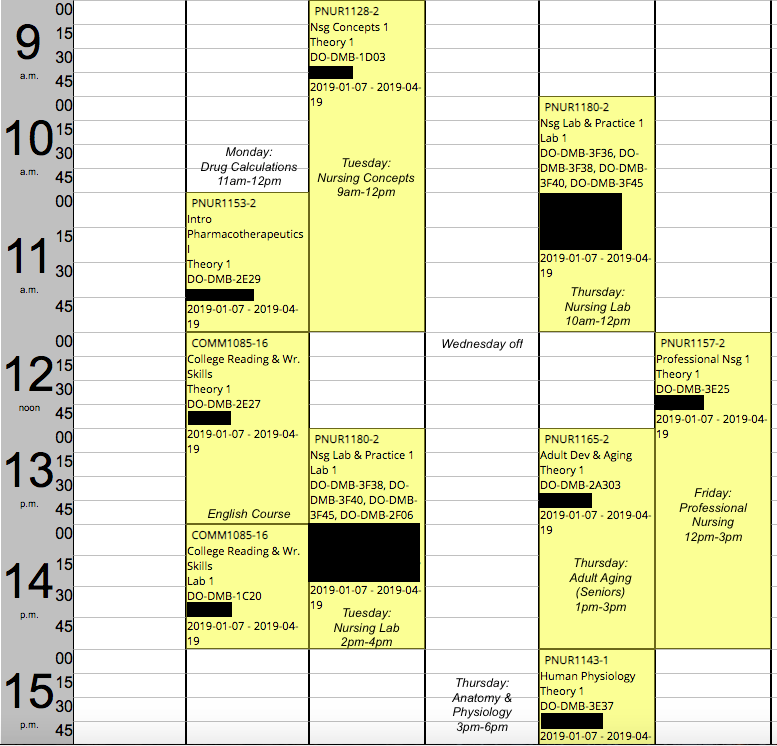
Here's my schedule from Jan 2019. There is also an online nursing course and an elective that you have to take.
-
July 22 is the equal consideration date. They probably won't send out acceptances before then. With those marks, you will get in for sure. I started in Jan 2019.
-
I don't know if there's a thread for Conestoga, but I was accepted into the RPN program there for January a couple of weeks ago. I applied in July and did the HOAE in early August. Anyone else?